Tuesday, 30 September 2008

The Last Day of Harvest Time and a Train Timetable!

jsch_harvest_add5_ribbons

Hi all!! The headache is much better today and that makes me feel so much brighter!!

Men, they're a funny breed...they think differently to us ladies..I'm convinced they do!! I think that men think in straight lines..one line at a time mostly. We women tend to think in multiple lines, a bit like a train junction!! Could be that with kids you have to learn to multi thought as well as multitask, lol!! Or it could be we're just devious!!

Anyway, my long suffering DH was listening to me moaning and clutching my head yesterday with that far away look in his eyes that told me he may not be giving my agony his full attention, his single line of thought was not where it should be. So I thought I'd throw him a side winder to see if he was paying attention!! (Makes me sound a bit like a bad tempered baby.)

"What makes a good relationship" I asked. There was a long pause...so long I thought..he's not listening...then he said "It varies". OK, typical man talk for "Why do you ask me stupid questions". Evasive.....definitely!!

Feeling rather grumpy and sore I went in for the kill. "So what makes our relationship work?" I asked. The answer was fast...."Oh that one's easy. I always know where I stand with you and when your not moaning...you make me laugh...not always intentionally".

Well, I was shocked...he was awake and he was listening and more to the point he gave a cute answer!! Could be he's smarter with women than I thought, lol!! So I decided the poor man deserved leaving in peace and went off to bed to be miserable there and give him a break!!

Enough of my ramblings..I tend to go off the track, I know, but now it's down to the good bits.

Today's the last day of the CT Collab Kit for this month and the last of the goodies are awaiting you!! I'd like to say a great big THANK YOU to all the CT girls who took part in this for their hard work and for sharing their talent. Well done ladies, your brilliant!!

But the other news is the goodies don't stop there...tomorrow starts the Fall Splendour Blog Train with more than 59 designers taking part so check back here for my part and then jump on the train to the next stop!! Mark your timetable and make sure you don't miss tomorrows train!!

My little Add On today is some folded ribbons with harvest words.

You can download the Harvest Ribbons here

To finish off this months CT Collab Kit Tragedy Anne has made a fantastic template and Tracy's (Latte Dah) wonderful contribution make your harvest of goodies complete!!

cen stuff_Sept CT preview

Drop by Tragedy Anne's Blog and pick up her brilliant template!! It's a stunner!!

  tracy

To add Tracy's beaded word art, belt, laced frame and other goodies to finish your collection perfectly, drop by her blog Latte Dah Designs and snag them!!

That's the end of the CT Collab kit but tomorrow starts the Fall Splendour Blog Train!!!!!!

See you then!! Have a great day!!


,

Stumble Upon Toolbar

Monday, 29 September 2008

Lymington Revisited and Some More Harvest Goodies!

 jsch_harvest_add4_frames

Yesterday I woke up with a headache that felt like I had spent the night on the town! My mouth was like the bottom of a bird cage and I just wanted a hole to crawl into. The irony was that not a drop of alcohol has touched my lips for an age..not even a glass of wine..in fact I think I'm deprived...no!! not depraved!!

I spent the morning muttering about there being no justice, as my youngest son had been out till goodness knows when clubbing with friends...and he looked good when he got up, it was me that looked like I had overindulged in a big way...he was fresh as a daisy. It must be youth or some magic potion he has, lol!!

Saturday saw me wandering around Lymington Street market with Lilly, Charlotte, Chris and Ashlyn. In an alley off the market is a great flower place and I couldn't resist a peek,,,just to see if they had anything that inspired me. They did...some Chinese lanterns and some dried corn, so when I feel a little better..well, a lot better really..hopefully, I will have a go at being inspired by them.

Lymington is on the coast and the main street is set on a hill leading down to the old quay. It's an old town, a small one, but a pretty one. It's a draw for tourists in summer but even now the weather and seasons are changing it still has a lot of yacht people passing through. So it's always bustling on Saturdays.

The market always has a terrific atmosphere and is a wonderful place to wander, with all it's colours and smells. We ate lunch in an Italian restaurant just off the market with a wonderful garden terrace and we were in luck..it was a beautiful sunny Autumn day. Ideal for a light Saturday lunch with some gorgeous food to nibble and chat over. Lilly loved it all...the hustle and bustle, the colours and the noise. She smiled all through and of course gave the onlookers her royal wave!! If they were very attentive they got a clap too, lol!! So a great time was had by all.

But enough of my weekend..."what about the goodies" I hear you say..OK, I'm getting to them!!

My little add on is 4 Harvest Frames...quite simple ones really. But today it's Kim who has the fancy stuff!!

You can download Add On 4 - the Harvest Frames here.

Take a look at Kim's terrific kit ..harvest moons and scarecrows, laces, flowers and lovely papers...it's one you'll use again and again!!

So visit her blog, Kim's Scrappin' and start downloading!!

kim1

kim2

A visit to Kim's Scrappin' will add to the harvest bounty..so drop by and collect her kit

That's it from me for today if you love templates then drop by for the last part of this CT Collab and find out more!!

Have a wonderful Day!!


Stumble Upon Toolbar

Sunday, 28 September 2008

Sunday's Harvest and The Tax Man!

jsch_harvest_add3_bows


It's Sunday again...an other week has sneaked past me and is gone!! My life seems to fly before my eyes as quick as a flash!! In no time I'll be gone and my descendants will be looking up my family history, tracing my life!

Someone asked me the other day what I thought I would be when I was a very old lady. I was puzzled for a moment by the question...the answer was obvious...I'd be a very old lady!!!! But perhaps that's not what they meant? Yet another case of not asking what we actually want to know!! Or perhaps I'm just obtuse!

This week I sent a letter to the Inland Revenue for my son query his tax code. He isn't very happy with the tax system at the moment so imagine his horror to learn that he comes from a long line of Excise Men himself. Ok, so it was in the 1800's but one line of our ancestors had postings around the UK checking on the tax paid on wines, tobacco, brewing and general excise work. In fact several rose quite high and one found it all too much and actually killed himself whilst still in the service. It was in fact viewed as a good job then..may not have been popular with some of the population though and obviously times haven't changed much!!

My son's skepticism that his line could possibly have been Excise Men was short lived when I gave him some proof...a document dated May 15th 1826 relating to his ancestor, Joseph Merry, who was at that time 25 years old. It's describing his skills and areas he had been instructed in. Joseph was just at the beginning of his career and was to go on and do well in the Excise Service.

Shock, horror....so it was true..his ancestors were tax men!!! My son has made me promise I won't spread it around, lol!! So, I thought I would keep it quiet and only tell you, in confidence of course, lol!!! I think I should send a link to this post to his email contact list!! Or perhaps not!! But....I could always do a layout with and add it to a few galleries!!

Here's a copy of the document in question..indisputable proof of our tax man line.

JosephMerry-cop

But now, back to the present and some great presents that are in store for you!

You can download my Add On 3 - the Harvest Bows here

The real star though has a real Harvest feel - the bringing in of all those wonderful fruits!! This kit is from Melanie and it is perfect for this time of year!! Look at those luscious apples and pears...yum!! They are all hand drawn too!! An other lovely addition to this awesome kit!

sweetasmel_septCTcollab_cens_previewelements

sweetasmel_septCTcollab_cens_preview

Don't miss this part of the wonderful harvest..swing past Sweet as Mel and snag it!

Well, that's all folks!! Have a wonderful day and check back tomorrow for the next part of this great CT Collab Kit! Those girls are stars!!!

Oh, if you had trouble yesterday with Debi's links, (they drove her wild yesterday) they have been fixed and she has a little bonus of two extra papers. So if you can pop back and get them now.

Stumble Upon Toolbar

Saturday, 27 September 2008

Come and Reap the Harvest

jsch_harvest_add2_borders


Yesterday's babysitting  was a great success, with Lilly playing to the gallery as usual, she is a born actress!!

We took her out and saw the most gorgeous handmade winter jacket/cardy.......we just had to have it, that is my mum and I. Lilly was not so sure to start with..but she decided that perhaps the pixie look was her thing and from there on she got very excited about it. When her mum saw it she fell in love with it, so at least we adults thought it was great. Mind you, I'd love to see one of us wear it, lol!!

I took a picture of her when we got her back and tried it on again ...OK it's a little big, well quite a lot!! But that girl grows like a weed!! Soon I'll be saying it's a little small. I think it's the bright colours that made her smile. She has learned to clap her hands and keeping her still for the photos was quite a job....those hands kept a clapping!! So excuse the blurring on the photos!!!

lilly_jacket lillysept

Now...it's Harvest Time and there are some more great crops for you to reap today!! The girls have been so busy doing some wonderful things with this month's collab kit. So let's have a look at what they have for you.

Today my little add on is some flower and fence borders.....but the real stars are Leaonna and Debi!! Their parts of this wonderful collab kit are beautiful!!

You can download my add on 2 - Flower Borders here

And then travel on to Leaonna's blog, Busyscrappin for her terrific kit. Leonna has some really individual pieces in her kit, rich gems and lovely frames to name just a few!

leaonna

Your next port of call should be to collect Debi's goodies!! Drop by her blog, Sweet Adeline Designs and snag them. I love those stripped papers Debi and that pumpkin is terrific!!

PreviewJPG_debi

So that's me for today...guess what I'm doing later! Entertaining....I have a visitor...you'll never guess who it is........... it's the lovely Lilly and her mommy!! I know, I only saw her yesterday..but Saturday is grandma's day...she visits me then and returns the favour...she grandma sits, lol!!

See you all tomorrow for more of Harvest Time. Have a great day, I know I will!

Stumble Upon Toolbar

Friday, 26 September 2008

Those CT Girls are Back and It's Getting Dark!!!

Autumn is really here, yep there's the falling leaves and misty mornings but more to the point it gets dark so early!! By just after 7.00pm it's dark and I live in the south of England so Scotland must be darker sooner.

Later this morning I'm travelling to Oxford, to baby sit the lovely Lilly. Her mum has lectures this afternoon and Lilly is lacking a sitter, so I will fill the gap. I have to admit it's my pleasure!!

I'm taking my mum with me, so Lilly will have both grandma and great grandma at the same time. Poor soul...we'll be fighting over who sees to her, lol!

But getting back to the dark bit...it means that we will be driving home when it gets dark, even thought we should be home around 8.15pm...it gets so depressing when the daylight hours get short. It's my pet hate about this time of year.

So if you live near Oxford stay off the roads about 6.30pm......or you may meet me!! Lol!! I hate night driving especially on roads that have no streetlights and you get dazzled by on coming traffic. My husband did sarcastically suggest night vision goggles should fix the problem..men!!! I'll treat that remark with the contempt it deserves and get my revenge later, lol!

Now for the real News! It's that time again and some of my terrific CT Girls have made a new Collab Kit for your all!! This month their theme is Harvest Time, and what a brilliant job they have made of this one.

So for the next 5 days check in and get some new goodies each day to add to this great Kit.

Linda and Bina are getting us off to a wonderful start with their marvelous contributions..plus as usual I have done an extra little thing to add to your stash!! So there should be a bountiful harvest of scrapping goodies for you for the next few days!!

For my add on I used some of Bina's papers and made you some tags.

jsch_harvest_add1_tags

You can download my harvest tags here

 linda

 Drop in on Linda's Lot and start your collection with her beautiful kit

bina

Visit Bina's blog and collect her wonderful contribution

So have fun and see you tomorrow with more harvest gifts!!

Stumble Upon Toolbar

Monday, 22 September 2008

Making Basic Buttons Tutorial and Freebie Buttons

jsch_basic_buttons

Edit 23 Sept 15.41  GMT: I apologise to those of you who downloaded the buttons earlier...I had saved them at the wrong resolution!! I have updated the file with the correct zip now, so please download the updated file. Sorry!!

Last week I said I was running day behind with my week...well that still holds good!! I just never seem to have made the day up. I'm thinking of rearranging the calendar and subtracting a day, just for me. Only problem is I don't know who to apply to, lol!!

I love buttons and there are so many that you can make, the variations are endless. Then having made them you can add stitches or bows, even more fun!! For today I thought that a basic button would get us started. It will show you how to save a basic button template to use again and again too.

The tutorial is written in Photoshop CS2 but I am sure you can adapt the principle for your own software program.

If you prefer to download it as a pdf you can do that with the link at the end of the tut and there's an other link to download some freebie little buttons that I made for you.

So Lets Make Some Basic Buttons!!

1. Open a file with the following settings, just I have done. 600 x 600 pixels, 300 pixels/inch, RGB Colour, 8 bit, Transparent. (This size makes it large enough for you to work comfortably but you may want to reduce the size of the finished button).

 image

2. Now set your foreground colour to black and background colour to white, the quick way to do this is press D.

3. Next select the Ellipse Tool from the side tool bar.

image

Make sure you have the Fill Pixels option selected in the top tool bar.
image

4. Now to make our circle! Hold down the shift key and draw out a circle (holding down the shift key as you drag makes sure that the circle stays in proportion). Remember if as you draw you want to move the circle, press the space bar and hold it down, this will give you  the little hand symbol which will allow you to reposition your circle…but don’t let go of the mouse whilst your doing it!!

5. Now add a new layer above your circle by clicking on the icon at the bottom of the layers palette or from the top menu bar Layer/New/Layer. This layer will be for our holes…yes, our holes.

6. Making sure that the holes layer (layer 2) is the active layer, change your foreground colour to white. A quick way to do this is press X.

7. Now select the brush tool from the side tool bar and pick a hard round brush the size you want your holes to be. I have used a hard brush at 60 pixel size for mine. Click once with your mouse on the new layer to make one stroke with the brush.
image

8. Select the Move Tool from the side tool bar and hold down ALT and then click on the hole and drag. This will duplicate the hole layer and now we have two holes on two separate layers.
image

9. We need to line them up with each other as they are looking rather out of line. So hold down the Shift Key and click on each of the hole layers so that they are both active.
Now click on the Align vertical Centres icon in the top tool bar to line them up.

image

10. Merge these 2 layers by holding down Shift and clicking on both layer to make them active, then press Ctrl and E to merge. We now have both holes on one layer.

11. Now we need to align the button and the holes  so make sure that both layers are active by holding the Shift Key down and clicking on each layer. Then click the Distribute Horizontal Centre in the top bar to centre them.

image

Now our holes and buttons are align properly.

image

12. Now comes the clever part!! Select the Holes layer and change the fill value to 0.

image

13. Open the Layer Style (double click on a blank area of the layer name).
Under Advanced Blending change the Knockout to “Deep”.

image

Next click on Bevel and Emboss. Change the style to: outer bevel, turn on anti-aliased then click OK.

image

And we have punched out the holes and applied a style to them. At this stage I save the black button as a png file so that I can use the basic template again.

Now we have the basic we can go on to the next step - giving the button some shape and colour!

18. With the button layer selected open the layer styles palette and click on colour Overlay. Pick the colour you would like your button to be. I used a blue, 7e92b6. It is easier to change the colour for the button here than changing the template colour.

image

Keeping the layer style palette open click on Bevel and Emboss and use the settings below:

image 

Note that I have changed the Shadow Mode Colour from black to a slightly darker shade of my blue. This makes for a less harsh contrast on the bevel.

19. Now click Contour. I’ve changed the Contour here to Rounded Steps by clicking on the little arrow at the side of the Contour Picker. I moved the slider and set it at 21%.

image

If you want try picking a different contour and then playing with the sliders, This will give you different shaped ridges. When your happy press OK.

Here's what my button looks like.

image

There are so many other things we can do to dress up our button, patterns, texture etc…. but that’s for an other time!!.

You can add Texture and overlaying a texture on it. Play with the scale and depth of these until you get the effect you want.

Also try overlaying a pattern. Click Pattern Overlay and then select a pattern and play with the opacity and scale.

The permutations are endless!! Have fun!!

Download the tutorial in pdf here

Download the freebie buttons here

Stumble Upon Toolbar

Friday, 19 September 2008

I'm Stamping Mad!

jsch_stamped_flowers_pre

Today my emphasis in this post is...new. New awards, new ventures, new journeys, new freebie...everything NEW!!! Except me!!

I must admit I could do with a new me...but that will have to wait until someone comes up with something really radical, lol!!

This week the news has been so full of financial matters that affect all of us no matter where we are....it's scary really how quickly things can change. People say it's because we have better communications now, so news good or bad, travels fast...but I'm not so sure that's the full story.

I know that in the late 1800's and into the 1900's we had a wonderful postal system here in England. For example men who worked in London and travelled in from the suburbs by train kept a supply of blank postcards. Why you ask? Because if at lunchtime they thought they may be late home for dinner they just wrote a postcard and dropped it in the mail. The postcard must have had wings because it was delivered to their home by late afternoon, around 4.30pm!! How's that for communication!! They had up to 10 deliveries a day to their houses just for normal mail...imagine that today...my postman would almost become a permanent resident in my house!! Lol!! So, good communication was there at least on a national level. It just shows that progress doesn't always improve something!!

OK...now for my gift to you for today. I have some stamped flowers, commercial use is OK. The preview above shows them unblended, the image below shows them with a blending mode of Colour Burn. The download included the two coloured flowers plus 2 grayscale, light and dark for you to make your own. All the file are in png format. I love stamped things and keep going back and trying to improve my technic...so expect more of this stuff in the future!!

Here are the flowers using Colour Burn Blending Mode, 100% (I didn't alter the opacity for the image, but you can!)...just thought I'd give you a peek at them and how you can play!! I have made them quite large so that they rescale quite easily too.In fact there are lots of things you do with, recolour etc...have fun!!

jsch_stamped_flowers_pre2

You can download the Stamped Flowers here

Some more NEW! I've got to tell you about-  a brand new award and a journey..with a twist!!The first is an award which is the creation of Nezzi (Jessica) and the other is a cute little caterpillar named Gogga, The idea with Gogga is to send him/her around the world by blog hopping. Gogga, is such a cute little thing, how could I resist..I got from Gabrielle, who's in Ireland. I love the logo for this one, those eyes! He reminds me of myself after too long at the PC, lol!!

OK, so first Nezzi's wonderful "Never Ending Energy Award". To find out a bit more about the award and why she made it take a look here.

Neverending_energy_award

Thank you I am really honoured that you added me to your list Jessica. Now I pass it on to three people and here are mine:

Candee of Mermaids Haven - she has so much energy and does so much..and I love her work!!

Kim of Kim's Scrappin - she always has so much to do but always finds time to help and be a good friend.

Sammy D, owner of Scrappin Digi Kreations - she has always shown patience and humour in all my dealings with her..she's a star to put up with my blonde moments, lol! I don't know if Sammy has a blog but I had to add her to this list, she so deserves it!!

Now for Gogga!! He is so cute!!

CoolClips_GOGGA

I choose these three to help him on his trip around the world!!

Melanie of Sweet as Mel as she is in South America

Stella of Stellarific Creations as she is in Australia

Glynis of Ghunibee Scraps as she is in Cyprus

Well, Gogga you really will be tired after all those miles, good job he has so many legs, lol!! I'm tired just adding all the links!!

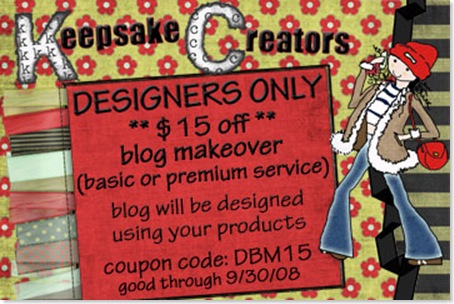
The next new thing is certainly worth knowing about!It's one of the best new shops that I have noticed recently and it's one with a difference. It doesn't sell kits etc but services!! Doesn't matter if your a hands on digi scrapper or not these girls have something for everyone...they even do it for you!! It's a combination of Tragedy Anne and her co-owner Diana and their services are awesome ...blog design, S4H, designer services and loads more!! They have an opening promotion with 15% off a blog makeover, so if your blog needs a revamp drop by Keepsake Creators and see what they can do for you!! the offer lasts till the end of this month.

DBM15coupon

You've been so patient with my ramblings that you deserve the link for today's freebie! Thank you for bearing with me!!

Stumble Upon Toolbar

Tuesday, 16 September 2008

Natural Things

jsch_naturlathings_frame

Hi Folks, I hope that everything is good with you all and that life is being kind to you. Miss Lilly visited at the weekend and stayed over night and it was energetic to say the least...but such a pleasure..that girl always makes me smile!! She is standing up all on her own...especially when she see the cat!! Not bad for 8 months!!

She sees that cat and she is away!! She spots him even through the window...there is no hiding place!! She crawls like a millipede and climbs like the cat himself, lol. Poor cat, he hates her!! Lol!!

lilly-stand2 lilly-stand1

Sunday was a sit down lunch for nine with two lunches to go.....so again, a busy day but a good time was had by all which made it all worthwhile. It gave time to catchup with everyone and find out their news, thankfully no bad news!! I was flying around believe me...I was like a plate juggler, all I needed was one of those stick to juggle them on, lol!

I know...what "an other frame", your saying!!! Yes, but this is one of my favourites!!! My little gift to you, a touch of nature, flowers and little bugs around a frame. Something to remind you of the Summer flowers now that Autumn is here.

You can download the Natural Things Frame here......but..

First checkout the lovely layouts and card that I really must share with you, they are beautiful!!

Paula is a brilliant card maker and I was oh so thrilled to see a beautiful card she had made for her niece using my Fashionista Kit. It has so many great details, she really is a great card maker!! Take a look!

P9090152

P9090154

An other one that made me smile was Linda's gorgeous layout of these two little ladies, the journaling is priceless!! She uses white space so well on this and the overall effect she has achieved makes a fantastic page!

A-Girls-World

Credits: Flora's dream by Cens Stuff, Template by LindaJD, Font Used - Rough Typewriter

Next we have Melanie's fantastic page. She linked the frames with the heart, scroll and flower cluster and it looks great!! The torn paper adds that extra touch!! An other absolutely wonderful layout!

pregnantandbeautiful

Credits: Simple Things by Cens Stuff, Template is from KimBsdesigns.

The next one is really special, it comes from my friend Glynis and it's a wonderful friendship page made with the Lace Mat recoloured. It was so nice to receive this, a sign of a shared friendship, complete with lovely butterflies! Thank you Glynis, I really love this!

June

I'm a bit late in posting this one but it's the first time I posted since Leaonna offered this brilliant, bling frame on her blog, commercial use too!!!So if you don't have it already pop by her blog and snag it!

cu friday

Well, it's late here and time for me to climb the big wooden hill and crawl into bed!! Take care and see you soon!!

Stumble Upon Toolbar

Friday, 12 September 2008

Lilly's Day and a Commercial Use Freebie

I'm back, fresh from a day with the wonderful Miss Lilly. That girl is so lively now that she has found her feet!! Oh to have that amount of energy all the time...what bliss!! On the days that I'm blessed with my little Cutie everything else stops....she needs your undivided attention or she is off exploring!!

She thinks the baby walker is for wimps or babies and she of course is neither of those..oh no, not for her the safe and cosy way!! She grabs the tray and pulls her legs up and next thing you know she is swinging head first...straight towards the floor...legs frantically pushing her downwards...eeek!!

She can crawl at the speed of light and then it's a rapid pull of the arms and she is standing up and seeing what she can grab!! She has just gone off to bed after her bath...mind you she didn't go quietly!! But it was a busy day and eventually exhaustion won out and things have gone silent...for now!!

Tonight I have a commercial use freebie, a grayscale textured frame plus a dressed up example.


 jsch_frame3_cu

You can download them here

Now for some terrific layouts! This one has the coloured photo as the background and it works really well. I love the word art and journaling and the photo in the corner is a great reflection of the background! A brilliant job Kim!!

My_Garden_kim

Credits: Simple Things kit by Cen's Stuff
Template 5 by Kylie M Designs
Photos by Kim
Fonts used are - Promised Freedom, Kingthings Annex

What little beauties from Linda, both the page and the those lovely girls!! I love the torn paper as matting and she has made that frame look really good!! Great job!

Flora_sDream_ljd2007

Credits: Kit Used - Flora's Dream by June Schutrups aka Cen'Stuff
Template by LindaJD
Font's Used - Vivaldi / Rough Typewriter / University Roman

expecting_you

Credits: Little Weeds by June Schutrups from Cen´s Stuff.

The template is also made by Cen's Stuff

The journaling has some bible verses of Psalm 139.

And last but not least drop by Jessica's new blog, The Scrappin Squad, as she has a great freebie for you too! It's a celebration freebie!! Don't forget to leave her some love!!

ssfreebiepreview


Time for me to go as I spoke too soon, saying all was quiet on the Miss Lilly front....she has decided that she has had a nap and now she wants up. I'll have to have a little word in her ear and advise her of a few facts of life! So bye for now.


Stumble Upon Toolbar

Thursday, 11 September 2008

White Rabbit Time Again and Flora's Dream.

OK, I'm doing my white rabbit impression again.."I'm late, I'm late!!". The last two days have just gone...too much work looking for dead people. Mind you I found so many it took me ages to write it all up...you can't win, lol!! I've been busy too with finish bits for the shop and other design things too, so there's not been a lot of time for much else...work, work and some more work!! I'm a harassed woman!!

I was going to wait till the morning but I thought I had best play catchup and tell you some of the things that are going on..so much to say that I'll do some tonight and then finish the news tomorrow or this post will be 10 pages long, lol!! I need to remember it's a blog...not an encyclopedia!! Watch out for a Commercial Use freebie tomorrow as well!!

So..some news! New stuff from me, news of a CT and Designer Call and three freebies from those great CT girls!! So keep reading!!

I have just put a new kit into the shops, Flora's Dream. Take a look!!!

JSCH_florasfll

Flora's Dream 40% off the first week!

(I just hope Flora's Dream was a better one than I had the other night!!) You can find it at my stores 40% off for the first week!!

In shades of chocolate, pink and blue Flora's Dream will suit so many different layouts.

The kit consists of: 12 papers - 9 patterned and 3 solid textured papers. 31 Elements: 3 bows, 2 frames, 2 tags, 3 journaling blocks, 5 buttons, 2 scrolls, 1 bead swirl, 4 brads, 2 paper flowers, 2 flower buds, 3 tabs, and 2 borders.

The Commercial Use stuff are some Crazy Border Templates  that with your imagination will make beautiful borders to add to your kits. Add a style and it's done...it's that easy. Or use as as a template to cut a great paper border. There are endless possibilities!!

jsch_crazytemp_01

Crazy Border Templates 1, 40 % off the first week!

jsch_crazytemp_02_pre

Crazy Border Templates 2, 40% off the first week!!

Are you looking for a CT spot or are you a designer looking to be part of a great new community and shop? If the answer to either of these is yes..then checkout the ads from Stella at Cottage Scrapbooks. She is recruiting at the moment but hurry not for long!!!

Cottage_Scrapb_CT_call

Ct Call Ends 1 October, more details here

Cottage_Scrapb_DT_call

Designer call, more details here

Ok now some more freebie news from my great Creative Girls!!

Kim has got an wonderful piece of Word Art for you on her blog so drop by and collect it, don't forget to leave her some love too!! It is a really beautiful piece. I just love Winnie the Pooh!!

KS_Pooh_WA_pre_thumb[9]

Linda has some really stunning new papers on her blog called Summers End......you must get them!! They are brilliant!

ljd_SummersEnd_Preview

Tracy also has a freebie on her blog too, she's just learned how to do folded corner and she is willing to share!! So drop by and check it out!! Just right for Fall too!!

PumpkinPatchPrev_thumb[2]

I'll be back tomorrow with a CU Freebie and...I got an award from Candee...so catchup with me tomorrow for all the news, some gorgeous layouts and a bit of fun!! Have a great evening/day...what ever it is where you are!! Now it's off to bad and some much needed sleep!!

I promise...you'll get the sensible version of me tomorrow!!


Stumble Upon Toolbar

Tuesday, 9 September 2008

Autumn Leaves..And Lots of Rain!!

jsch_autumn_papers

Hi all, we in Britain, like most of the northern hemisphere are still suffering from too much water...the sky sort I mean. I think I'm going to get webbed feet and a beak!! Today I was so cold and then to add insult to injury I got wet too!!!

I had my coat, umbrella etc but the wind just kept sending the water in all my little unguarded places....I never knew I had so many!!! Result....even my underwear had soggy wet bits!!

OK your thinking, why didn't this lunatic stay in doors? I was bug hunting, of course. Charlotte needs bugs..so I was roped in to find snails and beetles. She was searching Oxford and I was doing the forest. I have to admit the beetle bit isn't really my cup of tea..snails no problem but beetles...they had better be small that's all I can say!! She needs them for her studies and she got her dates wrong and thought she had longer than she had to collect them...so panic!!

I went out armed with my jars..no rain, lots of clouds and wind but not a drop of sky water. Mind you there were no beetles either, lol! I think the beetles knew the rain was coming or they had all died of cold! The wind was more than breezy so I suppose the cold was it's fault.

I walked quite a way from the car and was just thinking of turning back before I blew away when it happened...the sky opened and someone up there threw down the equivalent of several lakes....I didn't know I could run so fast!!

All that and I only had four very small snails...note the I did have...when the rain started I forgot the jar and ran. Luckily for the snails I had opened it and so by now they will be back with their families!! Not the most productive day I've had!!

Now for tonight's freebie. It's some Autumn Papers that I made whilst playing with some brushes, with a couple of plains thrown in. I like them..I hope you do too!! I changed them a bit from last nights sneak peek, now look less flat..or they do to me, lol!

You can download the Autumn Papers here

Well, I'm off to climb into bed and try and get warm!! Yes, I'm still cold!! I must be getting soft in my old age, lol!! So, stay out of the wind and rain...if you can.. and see you soon!

Stumble Upon Toolbar

Monday, 8 September 2008

Autumn Leaves are on the Way!

jsch_autumn_frbr_pre

Hope everyone had a great weekend, I had a visit from Lilly on Saturday...just a flying visit but a thoroughly enjoyable one. I don't know why but on Saturday evening I had the most horrible nightmare about her. I never remember my dreams but this one I did, only too clearly!!

It was one of those dreams that when you wake you are convinced it really happened...then you think and logically it couldn't have. Then you spend the next few hours trying to get back to sleep and convincing yourself it was only a dream. In my dream she was a little older and I had taken her out. Something happened and I lost her......the panic!!!! I can still feel it now.I know that I can sometimes misplace things...but that was just pushing it!! As if I would lose the wonderful Miss Lilly!!

The mind is a strange thing..especially mine...and it really played tricks on me that night!!

On a brighter note..I have been playing with some leaf brushes as like it or not it's that time of year again when the trees will soon be bare. I had a great time making them and then playing around with the results..so I thought I'd share some of them with you.

I made some frames and borders that I liked...I have to admit the preview doesn't do them justice. They are quite pretty. Have a look at the close up.

jsch_autumn_frmae_clos

I made have some papers that I will have as the freebie tomorrow. Here's a peek at some of  them. Check back tomorrow to snag these and a few more!

jsch_autumnleaves_pap_pre

You can download today's Autumn Frames and Borders here

I have two exceptional layouts fro you to share. they're both by Deb (Cra-Z-cat). The first layout is a stunner and so is the little cutie in it!! I love all the little details on this one...flowers, stitches, matting ...I could go on and on! It's a brilliant page and thank you Deb for sharing it!!

Rebecca - Campindeb

Credits: Emma by Cen's Stuff, Doudouloisirs_template12

On this one, the word art made me smile and so did those lovely little lobsters!!This is a wonderful way to save one of life's moments that would other wise be lost. An awesome page, with a wonderful sequence of photos!! Thank you for letting us all share it!

Rebecca - Crayfish

Credits: Aug08 CT Collab kit, Janniscrap designs - under the sea, Niklasjustin - template 45

That's all for this post folks!! So it's bye from me and see you all tomorrow!! Take care and don't dream...well not bad ones!! Make them all good!!

Stumble Upon Toolbar

Sunday, 7 September 2008

Tutorial Sunday

preview_frametut

Today's tutorial is on cutting out shapes..

Once you have read this tutorial you should be able to make great cutout shapes to dress up and add as elements to your layouts. When you understand this simple technique you can apply it to lots of things the only limit will be your imagination!!

I'm going to show you the easiest way to do it and I'll try to keep it as simple as possible. Well, that's the theory, lol! I have written it in Photoshop CS2 but the basic principles holds good for so many programs...try adapting it for yours!

If you prefer to download the tut as a pdf there is a link is at the bottom of the post.

Or if you just want the example shapes..be my guest, again a download link is at the bottom of the post.

So lets go!!

I've chosen a size that will let you see what your doing easily, you normally wouldn't make these so large, but they can easily be resized.

Open a new file 4inches x4inches (1200 pixelsx1200pixels), 300dpi, transparent.

Before we start, make sure you have black as your foreground colour and white as the background colour. (Quick Photoshop tip - press D for a fast way to reset the colours to black and white)

Now click on the custom shape tool and pick the shape you want for the base. I've picked the ellipse tool as I want to draw a circle but you can choose any shape. 

To choose the circle

Click custom tools

image

Then choose the ellipse tool

     image

Make sure that you have "Fill Pixels" as the option in the top tool bar. (As this tut is a fairly basic one this is the easiest option for you)

image

To make sure you get a perfect circle, click on the custom tool shape in the top tool bar and from the options pick Circle.

image

Now lets draw our shape. click and drag out the circle using you mouse.

Remember if the shape goes out of the window as your drawing it, keep holding down the mouse and press the space bar. This will allow you to move and reposition the circle until it is all in the window.

image

Now change the foreground colour to white to draw our shape so that we can see it against the black base layer. (Quick Photoshop tip - Press X to change the background colour to the foreground)

Next we need to make a new layer to draw our second shape onto, so click the little icon at the bottom of the Layers palette to make a new layer.

image 


So what sort of shape will we cut out of out the circle? The choice is yours, but I
have picked a heart shape from the custom shapes to cut out of mine.

Select the shape you would like and holding down the Shift key and drag out the new shape on your new layer (Layer 2). Holding down the Shift key at the same time means that the shape will not distort.

Because you can see the basic shape layer underneath it helps you get the size right for
the cut out. If you get it wrong the first time and your not happy with the size just
CTRL Z and undo the step.

 
You should have something that looks like this, depending on the shapes you picked.


image

 
To make sure that we get the cut out in the centre of the circle shape we need to make sure they are aligned.

To do this we need to make both layers active.

So holding down the Shift key, click on the thumbnail for the base shape and then, still holding down the Shift key, click on the thumbnail for the cut out shape layer.

You should have both layers now showing as active like this.

 image


To make sure they are exactly centred, go to the top tool bar and click on the align
horizontal centres symbol.

 image


Then click on the align vertical centres symbol.

image 

So now everything is centred ready to cut out the shape.

image 


So let's start cutting!

Click on the heart layer is the active layer (Layer 2). Then press the Ctrl key and holding it down click on the thumbnail (the little picture icon). This will give you marching ants around the heart shape.

image

Now click on the circle shape layer (Layer 1) and then press Delete.

To deselect the selection and get rid of the marching ants, go to the top tool bar and pick Selection/Deselect (Quick Photoshop tip- Press CRTL D to deselect)

image 


To see our circle with the heart cutout clearly we need to turn of the heart shaped layer (Layer 2). To do this click on the eye of the heart layer (Layer 2) to turn it off.

Now you can see the circle shape layer (Layer 1) with the cutout area you have just done.

You can resize it, colour it, apply a layer style or use it to cut the shape out of a
background paper to add to your layouts. There are so many ways to use this simple technique all it needs is your imagination!!

Don’t forget to save the shape as a png file so you can use it again!!

Download the tut as a pdf here

Download the example shapes here

Well, that's me for today...so have fun and see you soon!!!


Stumble Upon Toolbar

Saturday, 6 September 2008

News of Three Great Freebies!!

I decided that I needed to do an extra post today....I know I said I'd post Sunday with my tut but I will still be doing tomorrow's post with the tutorial. I just have so much to tell you that it would have made my post tomorrow huge!! So you get an extra one today with news of two new freebies for you!!

You may already know that I have some great new brag book pages in the store at Cottage Scrapbooks that are part of the 40% off sale!! They're  made from my Simple Things Kit by the wonderful Tragedy Anne.

(Yes, I know it's spot the deliberate error time....well, not deliberate but an error!! I forgot the S in Things in my previews!! Grrr...I need to slap myself for that one!! )

PLUS

There is a little freebie too!

Two brag book pages as my little gift to you. Have a look!

 jsch_simplethingsbb_pre

Set of 6 brag book pages 300dpi, 6x4. You'll find them here 40% off!!

jsch_simplebb_free

Drop by and collect the free brag book pages at Cottage Scrapbooks

Plus I HAD to tip you off about Candee's blog!! As part of the celebration of the launch of Cottage Scrapbooks she has made a wonderful kit called "Stella' Little Cottage. the first part is  "on her blog Mermaid's Haven and it is fantastic!! The second part is tomorrow....BUT you need to get it fast, as it will only be on her blog until Monday midnight!! So drop by and snag it!! I think the cottage is a little work of art!!This girl is brilliant!

CanDesigns_Stella's_Little_Cottage_prv1


CanDesigns_Stella's_Little_Cottage_prv2

Get this great kit at Candee's blog Mermaid's Haven..but be quick or it will be gone!!

And finally Kim from Kim's Scrappin..(who I am proud to say is on my CT) has the Element Set to go with her Color Purple Paper Pack on her blog today.

KS_ColorPurple_Elements_pre_thumb2

Drop by Kim's blog and if you missed the papers then snag them too!!

Right that's me done for today but don't forget to drop by for the tutorial tomorrow!!

See you then!


Stumble Upon Toolbar

Friday, 5 September 2008

Commercial Use Friday

 jsch_bitsandbobs_cu

Rain, rain go away, come again an other day! If only it would!! Today has been horribly cold and windy, plus very wet...yuck. I have been soaked twice today as there was no avoiding going out. My poor car thought it was on the beach as the water splashed over it's roof from passing traffic and it waded through huge puddles.

I had hoped the weekend would be better as I wanted to go for a forest walk...but instead they have issued a severe weather warning about the rain..so it's in the dry for me this weekend!!

Today's Commercial Use Ok Freebie is just Bits and Bobs. You have a border, a stitched heart patch and a stitched button strip...all for you to use your imagination on. The download includes templates in psd and png files plus the examples. I hope you have some fun playing with them!

You can download Bits and Bobs CU here

Stop Press -I've taken over the Flavour of the Month Challenge at Cottage Scrapbooks from Stella and I know I'll have some fun with that in the next few months. I love colour...(in case you hadn't guessed, lol!) so this is the one for me.

This month there is a choice of 4 palettes, all nature inspired. The idea is that your layout reflects the current month in your neck of the woods. September here in England starts the swirls of the first falling leaves with rich coloured berries in the hedgerows, empty nests and that mist that hangs over fields and hills every mornings. You can almost smell the seasons changing!! That is if it's not raining!!

There's a little posting bonus too - so drop by and join in the fun!!

jsch_sept_challenge-gift

Find out more about the Flavour of the Month Challenge and get this posting bonus!!

I off to get something to eat and finish getting warm!! I'll see you Sunday with an other tutorial..so pop in and have a look! If there's anything you'd love a tut on just drop me an email and I'll try and fix something up!!

Have a great weekend!

Stumble Upon Toolbar

Thursday, 4 September 2008

Love You Three!

 jsch_loveyou_part3_pre

An other week gone...where did it vanish too? One minute it was Sunday, then I blinked and it was Thursday!! Time flies by so quickly I will be ancient before I know it!!! So I'd better keep moving and fit as much in as I can whilst I can, lol!

I am I hope, a tactful person and would never knowingly hurt or offend anyone, but  I still say what I mean...not use words to shadow box with people to my advantage. Yesterday I had a conversation with a client and it was painful!! She definitely did not say what she meant!! It wasn't to save my feelings, it was to try to manoeuvre me in the direction she wanted for her benefit. The stupid thing was I knew exactly what she was doing and it made me so mad..but I smiled sweetly (you would have been proud of me)!

Afterwards...with steam coming out of my ears at having to act as if I didn't know what she was up to..and feeling that perhaps I should not be so polite, I started thinking about the phrases we use in everyday life that don't say what we really mean.

I had to admit, I too was guilty of doing it...like the other day and a conversation with my DH.

Quote:

Me: That shirt looks great but the blue one really looks special with those trousers.

What I really meant was "I hate that shirt, why are you wearing it again!! I really must hide it...preferably in the bin!"

I came to the conclusion that there is not a person on the planet who says what they really think all of the time....and I ended my musings with the smile back on my face and accepting that life and people are not perfect!

Back to the important stuff now.

It's the last part of the kit today, the frames and some little flowers. If you missed the earlier parts then check the previous posts for the download links. I hope you liked the little gift that was my way of thanking all you lovely people who visit!

You can download Part 3 of "Love You" here

BUT there is still a little bit more!

This is a bumper day for you all as Jessica has made a beautiful Bonus Freebie for you on her new blog . She has made you all a set of 4 Quick Pages using the "Love You Kit"....and they are lovely!

Take a peek and then visit her and snag them...don't forget to leave her some love!!

QP preview

Download the Quick Pages on Jessica's new blog here

Before I go I have to show you this really special layout by Cindy. It was one of several layouts for a book she made for her nana..and what beautiful layouts they are too!! In this one she used the Lace Mat that was a freebie a couple of weeks ago and she has made it look lovely..thank you for sharing this lovely page. What do you think people? I know I'm right, it is gorgeous!!

TheGirlzPage_cindy

Well, time to go and do some reports. The sooner I start the quicker I'll finish, so it's bye from me and see you all tomorrow when I have an other CU freebie for you. Have a great day!! (and I'm not just saying that, lol!)


Stumble Upon Toolbar

Wednesday, 3 September 2008

Love you Two!

jsch_loveyou_part2_pre

I'm posting early today before I leave the house..I am so good (see the halo shine?)!

This morning didn't get off to a good start, the men of the house left for work looking very down in the mouth..one has a bad throat and the other a bad tummy...they were not a happy sight!! My sympathy was brushed aside and the mood was not good I tell you...there was a distinct frost in the air! Hopefully they will both feel better by tonight...poor souls.

Yesterday I tried out a tip that I got from my mum on cleaning wood with a mixture of oil and lemon juice..it does work but it takes time! Seemed strange but I'll try most things once! You have to work in small patches at a time, but it comes up well...in the end.

The first bit I did I went a bit mad and poured it on...mistake...it took me ages to get it off and it looked like I was getting it ready for the grill, lol!! But with patience it worked and it was quite therapeutic, it made me slow down and that has to be good. It gave me time for thought too...I know when I think it is normally so random it is sad, lol!

But a lot was achieved and I had a peaceful 2 hours spent with gentle rubbing...not me...the furniture!!

I've an award!! Mandy from Made by Mandy gave it to me, thank you Mandy!!  You brought a smile to my face!! I'm do appreciate it!!

 blogaward_mandy

Having said that....I'm meant to pass it to 7 people....but I have passed so many things to the wonderful people I admire recently, that most are threatening to strangle me!! So I am struggling to think of any who will not deal me a death blow if I tag them again, even with this great award!! I will pass it on but this needs some thought!!

I've got a mini blog now too..it's a great idea they have at Cottage Scrapbooks, everyone can have their own mini blog on site. Loving my blogging so much I started one there. I'll be posting mini tuts and the odd freebie too!! Just look in the menu bar at the top of the site and you'll see "blogs", click and pick mine..easy. Or better still join up and start your own. We mean to have fun there and this month being the launch month means some great parlour games and challenges ..... sales too!

Ok, so now we get to the bit you're looking for -Part 2 of "Love You "and today it's the paper pack. Take a look! If you missed Part 1 then snag it in yesterdays post. Don't forget we still have Part 3 to go tomorrow!!

 You can download Part 2 here

Well, it's off to work for me "to find a few more dead people" as my son would say!! (Sounds yuck) See you tomorrow for the last part of "Love You" and have a great day!!


Stumble Upon Toolbar

Tuesday, 2 September 2008

Love You!!

I do...I love you all!! Thank you everyone who leaves such wonderful comments both here and on 4 shared...I really appreciate them. You make it all worth while!! Thanks too for the suggestions you make to help solve my life's quandaries..they really help too!

So, I have made you a little something to say thank you for all the nice things you leave. Over the next three days you can collect the three parts of this little kit. Take a look.


jsch_loveyou_part1_pre


jsch_loveyou_part2_pre

jsch_loveyou_part3_pre


Today you can download the ribbons and journaling blog, tomorrow is the papers and Thursday is the frames and two little flowers. I hope you can use them.

Download the first part of Love You here

August here in UK has been officially the dullest wettest for 60 years, it was announced yesterday...as if they needed to announce it, lol! I have shivered through August with only wistful memories of summer to keep me going. We did used to have hot days in August (and July come to that!) but those days are gone it seems. Our share of global warming has gone to some other unlucky place, who most probably has too much heat to start with!! But that's life!

Before I go I just want to share some layouts with you..they are beautiful.

Tracy's daughter has gone off to college and she is missing her so, but it does mean that she has some more photos to scrap and so she has made this lovely layout to remember the great event of her first little bird flying the nest. I love the way you have the notice board at the side with the to do list! A beautiful layout, thank you for sharing it!

tracy

Credits: Little Blossoms by Cens Stuff

This great page from Jessica shows a great day out checking out some wonderful old trains. Look at the sky in those photos! I love the torn paper and the border Jessica. You've made the kit look brilliant!! A wonderful page! Thank you!

oldtrains_emma_jessica

Emma Kit by Cens Stuff (download Emma free here)

Time to go, but check back tomorrow for the papers to add to the Love you Kit. See you then!!

Stumble Upon Toolbar

Monday, 1 September 2008

Tutorial Time and Some More News!

jsch_frametut_pre


I promised you a tutorial and I have one for you tonight on making a basic frame and decorating it a little. I will show you screen shots in Photoshop CS2 but I am sure that you will be able to apply the basic principles in the program you use.....at least I hope so!! I have also included a little download with some styles for you to use to play with this one. Just load them into your presets. I have also included instructions on how to load styles in PSE5 and PSE6 in the download.

The example frame is also included in the download.

You can download the example and styles here

Before I start, news!! Stella from Stellarific Creations has started her own shop and online community, it goes live 1 September. Cottage Scrapbooks looks like a great community in the making. Stella has invited me to take part and I am looking forward to joining such a happy place. So make sure 1 September you check us out for loads of fun, challenges and of course freebies PLUS a month of 40% off in lots of things in the store!!!

opening-ad


Now lets get started making this frame!! I tried to keep it simple, so here goes!

1. Open a file 6inch x 6inch (1800x1800), 300 pixel per inch, background transparent.

2. First we're going to make a circle to do this select the Ellipse Tool from the shapes palette.

image 

3. Make sure that the shape layer is selected (see below).

image

4. To make a perfect circle easily click on the little down arrow next to the star shape icon in the tool bar and click Circle (see below). This means that you will get a perfect circle every time.

image

5. Put your cursor in the top left corner and draw out your circle...don't panic if it goes of the screen!!! Before you release the mouse button..press the space bar on your keyboard and move the circle where you want it!! Let go the mouse button and there you have a circle!

image

6. Now we want to it look like a frame, so click the subtract from shape icon in the tool bar.

image


Now drag out a circle to the size you want the "hole" to be..and before you release that mouse...hold down the space bar, this means you will be able to move the shape and position it where you want it to be. When you have it positioned then release the mouse button and you have...a hole!!

This is what mine looks like.

image

7. Now we have a shape but it still doesn't look quite like a frame. So we need to give it some style!! Now the magic starts!!

8. You can apply a style that is your favourite or you can use the layer style in the download.

To apply the style just click on one of the styles you have loaded in your palette.

image

9. You should have some thing that looks like this if you use one of the the download styles.

image

10. Now lets make it a little more interesting! You could at this point add elements you already have or we can add some using the shape tool. We'll give it try with the shape tool for now. So, select the Custom Shape Tool and pick out a shape you like I've picked a flower.

image


11. Now drag out the shape you chose. Notice that the shape has the same layer style as the frame. To change the layer style we need to change the layer style using the top tool bar by clicking the little arrow next to style and then choosing a new style for the shapes.

image

12.Now click on Add to shape area, so that we get all of the shapes we draw on the same layer.

image

Try drawing a few more of your shape around or on the frame, remember you can hold the mouse button down, draw the shape and then hold down the space bar to move the shape you have just drawn. The trick is don't release the mouse button until your happy with it!!

Here's mine. I've added some buttons quickly as the flower centres and that's it!!

image

Now save it as a png file and you have a frame!! Of course you have a limitless number of frames you can make by using different shapes and layer style..so have fun and experiment!!

I hope you have fun and give it a try..I'd love to see any you make!!

Well, that's all for today, have a safe day tomorrow and see you then!


Stumble Upon Toolbar